Ara Yahya
AI Financial Coach
.png)
AI Financial Coach is a concept exploration of how explainable AI can guide everyday financial decisions. Over a two-week solo sprint, I designed a mobile prototype across five core surfaces—Dashboard, AI Coach, What If, Goals, and Privacy—leading UX, UI, and AI interaction design using Lovable, Figma, and Gemini.
-
Product type: Concept – AI-powered financial coaching layer for retail banking
-
Timeline: 2-week solo prototype
-
Role: Product Designer (UX, UI, AI interaction & systems thinking)
-
Tools: : Lovable , Figma, Gemini ,GPT
The Problem
-
Money apps show numbers. People need guidance.


Users can view transactions, but they still struggle to answer:
-
Am I on track?
-
What should I do next?
-
What happens if I change my habits?
-
Why should I trust an AI with my finances?
Financial institutions also face:
-
Privacy risks
-
Regulatory expectations
-
Need for transparent, explainable AI
Opportunity
-
A calm, trustworthy AI Coach that speaks plainly.
.png)
A system that:
-
Gives users clear, gentle recommendations
-
Shows why the AI is suggesting something
-
Simulates future outcomes
-
Lets users control their privacy and risk tolerance
Constraints & Approach
-
No engineering team and no real bank data — this is a concept prototype using sample numbers
-
Time-boxed to a 2-week sprint, mobile-first only
-
AI-assisted generation (Lovable + Gemini) followed by manual UX refinement
-
Prioritized explainability, emotional safety, and regulatory-friendly patterns over flashy AI
-
Designed for an enterprise banking environment (WCAG 2.1 AA, clear copy, compliance-ready flows)
Design Principles
“Grounded, explainable, emotionally calm.”

One decision per screen

Emotionally safe tone

Explainable AI

Data transparency
Information Architecture

Each part of the system is designed to answer a core user question:
-
Dashboard : “How am I doing this month?”
-
AI Coach : “What should I adjust right now?”
-
What If? :“What happens if I change something?”
-
Goals :“Am I on track long-term?”
-
Privacy :“How is my data used?”
AI System & Data Flow

-
AI never acts on money without explicit confirmation.
-
All recommendations carry a confidence score and plain-language rationale.
-
Privacy settings directly shape which models and data sources are used.
Dashboard
Real-time spending overview with explainable AI signals.

-
Smart spending summary
-
Category insights with on-track indicators
-
AI-predicted month-end balance
-
Trust indicators like volatility band and autopay forecast
AI Coach
Explainable savings guidance with confidence score and impact forecast.
-
User asks a natural-language question
-
AI gives a short, structured answer
-
Shows plan impact, confidence, and why the user is seeing it
-
Alternative plans for different comfort levels
-
Primary action: "Accept & schedule this plan"
.png)
What If? Scenario Simulator
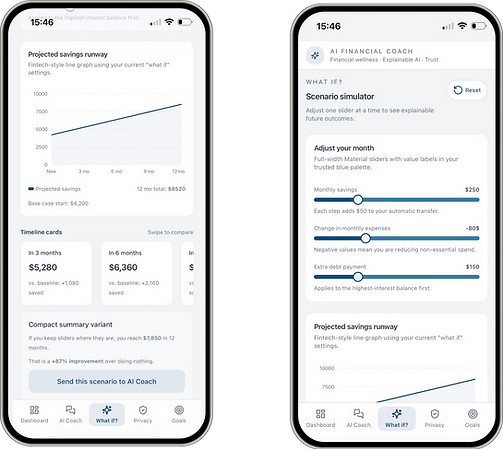
Interactive slider-based forecasting with explainable projections.
.png)
-
Adjustable sliders for savings, expenses, debt
-
Real-time graph updates
-
Timeline cards (3mo, 6mo, 9mo, 12mo)
-
Compact summary with quantified improvement
-
CTA: Send this scenario to AI Coach
Privacy & Trust Hub
Clear, user-controlled data permissions with explainable AI transparency.
.png)
-
“Guardrails on” mode for safety
-
Toggle-level data permissions
-
Risk exposure slider from strict → balanced → open
-
Clear list of data sources used
-
Download and delete data actions
Goals & Weekly Progress
Small wins, long-term progress.

-
Goal cards with progress bars and weekly plans
-
Status cues (“needs attention”, “stable progress”)
-
Weekly milestones selector
-
Smart nudges with numbers: “Move $40 from dining…”
Explorations
Key Design Decisions
01.Making the month understandable in 5 seconds
From information-heavy draft to single clear signal


Before : Early explorationInformation-dense dashboard showing transactions, metrics, and alerts at once.Users had to interpret raw numbers without a clear sense of progress.
After : Final design
A single monthly signal supported by an explainable trend and confidence level.
Users can instantly tell if they’re on track.
Design decisions
-
Reduced dozens of competing metrics into one primary monthly signal
-
Introduced a “Trend safe” indicator to replace raw interpretation
-
Designed for glanceability first, details second
-
Used AI confidence and projections to support trust without overwhelm
Design decisions
-
Reduced dozens of competing metrics into one primary monthly signal
-
Introduced a “Trend safe” indicator to replace raw interpretation
-
Designed for glanceability first, details second
-
Used AI confidence and projections to support trust without overwhelm
02. Designing Explainable AI Recommendations
Early AI recommendations surfaced actions without context, requiring blind trust from users.
.png)
Early exploration — opaque recommendation
Before :
Early AI recommendations surfaced advice without context. Users had to trust the system without understanding why a suggestion appeared or what impact it would have.
After:
Each recommendation includes confidence, projected impact, and a clear explanation—helping users understand why the AI is suggesting an action and what happens next.
Design decisions
-
Added confidence indicators to set expectations and reduce uncertainty
-
Introduced impact previews to show outcomes before users act
-
Included “Why you’re seeing this” to support explainable AI
-
Simplified language to remove financial and technical jargon
03. Calm, Supportive Language
Early version
“Reduce dining by $200.”
-
Sudden, absolute instruction
-
No timing, no context, no flexibility
-
Feels corrective and judgmental
-
Requires blind trust in the AI
Refined approach
“Move $40 from dining this week.”
-
Smaller, actionable step
-
Clear time frame
-
Explains why the suggestion appears
-
Shows impact before commitment
What I’d Explore Next
-
Validate recommendation language and confidence indicators with usability testing
-
Explore adaptive coaching tones based on user stress or confidence level
-
Partner with compliance and risk teams to refine guardrails for real bank data
-
Test longitudinal behavior change over 30–90 days
Reflection
-
This project reinforced my belief that AI in finance should feel more like a calm guide than an authority. Designing explainable, emotionally safe systems requires as much care in language and structure as in visuals. If users don’t understand why something is suggested, trust breaks—even if the math is correct.